Best Ways to Add a Reverse Camera to Your Car for Safer Parking
Adding a reverse camera to an existing setup helps improve rear visibility and parking confidence. This article reviews five vetted harnesses and camera kits that retain factory cameras or integrate with aftermarket displays, covering compatibility, installation notes, and practical considerations for American drivers.
| Product | Brand | Key Feature |
|---|---|---|
| Retain OEM Factory Backup Reverse Camera To New Aftermarket Car Stereo | ASC Audio | 6V converter included for Hyundai/Kia compatibility |
| Add Aftermarket Backup Reverse Camera To Factory OEM Display/Nav | ASC Audio | 16-pin connector; enables camera on display radios |
| Retain OEM Factory Backup Reverse Camera To New Aftermarket Car Stereo | ASC Audio | 6V power adapter; broad Toyota/Scion compatibility |
| PixelMan Backup Camera PMD2A-S | PixelMan | 1080P AHD with HD/AHD switching |
| RED WOLF Car Stereo Backup Camera Harness | RED WOLF | RCA harness to retain OEM backup camera |
These options balance OEM retention, aftermarket integration, and camera performance across popular vehicle types. The list includes harnesses for Hyundai/Kia, Toyota/Scion, Chrysler/Dodge/Jeep, and a premium PixelMan camera for clearer reversing views. Read on to compare features and installation notes before choosing.
Retain OEM Factory Backup Camera For Hyundai/Kia

This harness is designed to retain the factory reverse camera when upgrading to an aftermarket radio. It supports radios with backup camera inputs and includes a 12V to 6V step-down converter. Compatibility is focused on non-navigation Hyundai and Kia models with specific years listed. It is not a universal plug-and-play solution; some wiring work may be required for a clean install.
Add Aftermarket Backup Reverse Camera To OEM Display
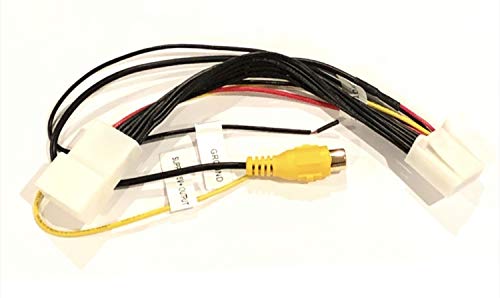
Designed to add an aftermarket camera to factory radios that have a display or navigation option. Uses a 16-pin connector and requires the aftermarket camera to feed via RCA. Works best on vehicles with compatible display/navigation radios. The installation may require verifying connector compatibility and potential wiring work to ensure a proper camera signal path.
Retain OEM Factory Backup On Toyota/Scion
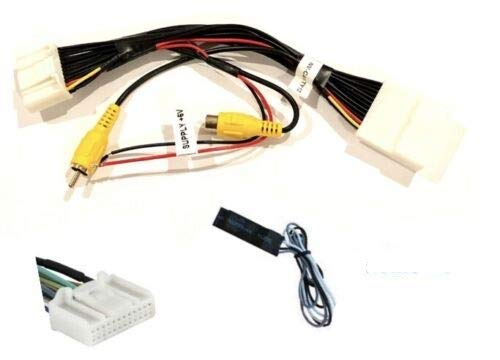
Factory camera retention harness with a 6V power adapter combo. It enables retaining the factory reverse camera when replacing the radio. Requires a radio with backup camera input capability and a non-navigation display/radio. The product note mentions potential for other vehicles if the connector resembles the pictured type, but manual checks are advised. Some wiring work may be necessary, as this is not strictly plug-and-play.
PixelMan PMD2A-S 1080P AHD Backup Camera
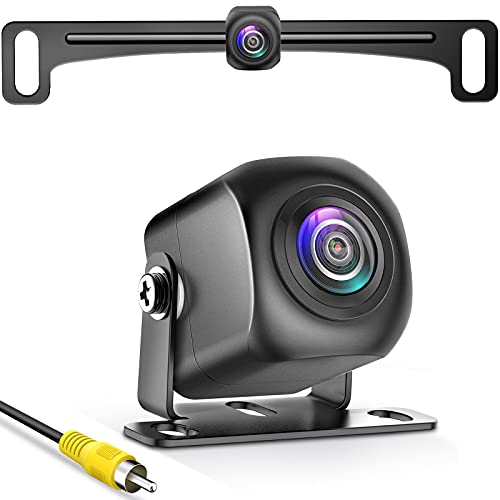
The PixelMan PMD2A-S is a high-definition backup camera with 1080P AHD output and a 170-degree wide angle. It supports HD and AHD switching for compatibility with screens that handle multiple input formats. The camera features IP69K waterproofing and a robust chip design from Japan, emphasizing clear daytime and night views and strong resistance to glare and distortion.
RED WOLF OEM Backup Camera Harness

The RED WOLF harness is designed to retain a factory backup camera for Chrysler, Dodge, Jeep, Volkswagen, and other models. It is not intended for factory navigation systems, focusing instead on preserving the camera feed to an aftermarket radio through an RCA interface. This kit covers a broad vehicle range, with caution to verify camera feed compatibility to avoid mismatches.
Backup Camera For Toyota/Scion Factory Display

This versatile harness supports retaining the factory reverse camera or adding a new camera to a factory radio with a display or navigation. It requires a 6V camera power source if retaining the OEM camera and a 12V-to-6V step-down converter (sold separately). It works with radios that support backup camera input and is not a universal, plug-and-play solution; some manual wiring and connector checks are advised.
Buying Guide: Key Purchase Considerations
- Radio compatibility: Confirm whether your head unit is a display/navigation model and whether it supports a backup camera input. Some kits are radio-specific (e.g., Toyota/Scion or Hyundai/Kia).
- Camera power requirements: Several harnesses require a 12V to 6V step-down converter for OEM cameras. Verify if this is included or sold separately.
- Connector compatibility: Check connector types (16-pin, 12V, RCA) to ensure the harness matches your vehicle’s factory or aftermarket radio.
- Installation effort: Some solutions are plug-and-play, while others need manual wiring and testing. Budget time for wiring splices, grounding, and securing cables.
- Weather and durability: Look for IP-rated cameras (e.g., IP69K) for reliable operation in rain, snow, and road grime.
- Video quality and format: Consider HD or AHD options for crisper images and compatibility with your display’s input mode.
- Vehicle compatibility: Each harness lists compatible makes and models; verify your exact year and trim to avoid incompatibilities.
- Future upgrades: If you plan to upgrade radios again, a solution that retains factory cameras can simplify future changes.
Choosing the right kit depends on whether you want to preserve the factory camera with an aftermarket radio, or add a new camera to an existing display. Both approaches aim to provide a clear rear view while maintaining compatibility with the rest of the vehicle’s electronics. Review your radio model, camera wiring needs, and the installation steps to determine the best path for your car.